You’ve probably heard the phrase “AI employee” a lot lately, either on LinkedIn, in a newsletter, or maybe even from us. But what is an AI employee, actually? This guide walks through it properly: what it means, how it works, the different types, a real step-by-step example, and how to know if your business actually needs one.
So, what is an AI employee?
An AI employee is software that handles one specific job for your business, all the time, without needing a break. Think of it less like a robot and more like a very fast, very patient assistant that never clocks off, answering customer questions at 11pm, following up on a lead the second it comes in, or booking an appointment while you’re at dinner.
What an AI employee is NOT
Neither it’s not a robot walking around your shop, nor it’s replacing your whole team. It’s not one single product, but a category – a way of describing software that does a real, ongoing job, rather than just answer a one-off question.
How does an AI employee work?
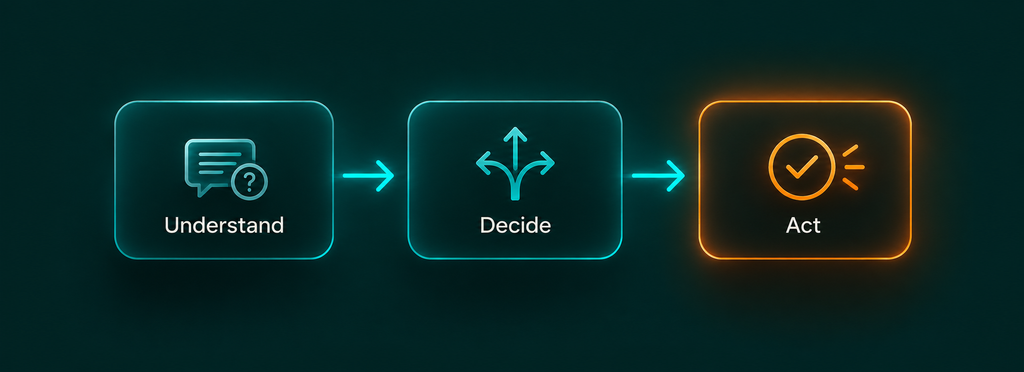
Underneath the buzzword, most AI employees follow the same three basic steps, every single time:
- Understand: it reads or hears what’s being asked (a customer’s message, a form submission, an incoming email).
- Decide: it works out what needs to happen next, based on rules and information it’s been given.
- Act: it actually does the thing: replies, books the slot, updates a record, or passes it to a human when it’s out of its depth.
That loop, understand, decide, act, repeats every time something comes in. The “smart” part isn’t magic; it’s that this loop runs instantly, any time of day, without someone having to be at a desk to trigger it.
The different types of AI employees
Not every AI employee does the same job. Here are the four you’ll come across most as a small business owner:
The Responder: answers common questions instantly. “What are your opening hours?” “Do you deliver to Westport?” – the questions you answer fifty times a week, handled the moment they’re asked.
The Scheduler: books, moves, or cancels appointments without anyone touching a calendar. Perfect for anything that runs on bookings: salons, clinics, coaching, classes.
The Follow-upper: reaches out the second a lead comes in, instead of the next morning. Most leads go cold in the first hour, this is the one job that genuinely costs you money when it’s missing.
The Sorter: reads incoming emails or messages and puts them where they need to go: urgent to the top, spam to the bin, everything else filed correctly.
Most small businesses only need one or two of these to start, not all four at once.
A real example
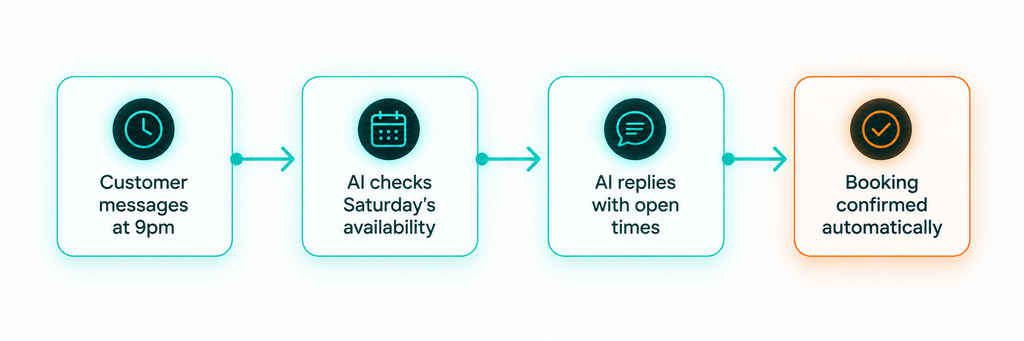
Say a hair salon gets a message at 9pm: “Do you have anything free Saturday morning?”
Without an AI employee, that message sits until someone opens the shop the next day, by which point the customer has often already booked somewhere else.
With one in place: the AI employee reads the message (Understand), checks Saturday’s real availability against the booking system (Decide), and replies with two open times, right then, at 9pm (Act). If the customer picks one, it’s booked automatically. If the question is something it can’t answer, it says so honestly and flags it for a person in the morning.
The real benefits for a small business
The biggest one is simple: it works when you can’t. Evenings, weekends, the middle of a busy shift, it doesn’t clock off. It also means the repetitive, predictable questions stop landing on you or your team. As a result, it frees up time for the parts of the job only a person can actually do, the conversations, the judgement calls, the relationship-building.
Is an AI employee right for your business?
A few honest signs it’s worth exploring:
- you’re losing leads because nobody replies until the next morning,
- you or your team spend hours answering the same handful of questions,
- or you can’t justify hiring someone just yet but the workload keeps creeping up.
If none of that sounds familiar yet, it’s fine to wait. This isn’t something every business needs on day one.
The real takeaway
An AI employee isn’t magic, and it isn’t a threat. It’s a tool that quietly handles the repetitive stuff so you and your team can focus on the work only a person can do.
If you’re curious whether this could actually save you time, that’s exactly the kind of thing we help figure out at Aella Creative Force.
FAQ
What is an AI employee?
Software that handles one specific, ongoing task for a business, like answering FAQs or booking appointments, continuously and without needing breaks.
Is an AI employee the same as a chatbot?
Related, but not identical. A chatbot usually just replies to messages. An AI employee is set up to take real actions too, booking a slot, updating a record, sending a follow-up.
What are the main types of AI employees?
The most common for small businesses: a Responder (answers FAQs), a Scheduler (handles bookings), a Follow-Upper (chases new leads instantly), and a Sorter (organises incoming messages).
Will an AI employee replace my staff?
Not typically, for a small business. It’s usually used to take repetitive tasks off a team’s plate, not to replace the people doing the parts that need a real human touch.
How much does it cost to set one up?
It depends entirely on what you want it to do, a simple FAQ responder is very different from a full booking-and-follow-up system. Best answered with a quick conversation about your specific tasks.